 CarviLabs
CA320T
ArduPilot Configuration
Coming Soon
ArduPilot Configuration
Step 1: Open Mission Planner and connect the Flight Controller to Mission Planner.
Step 2: Download the Custom Config file from the Github Link (coming soon).
Step 3: In Mission Planner, go to Config > Full Parameter List > Load from file, then click Write Params.
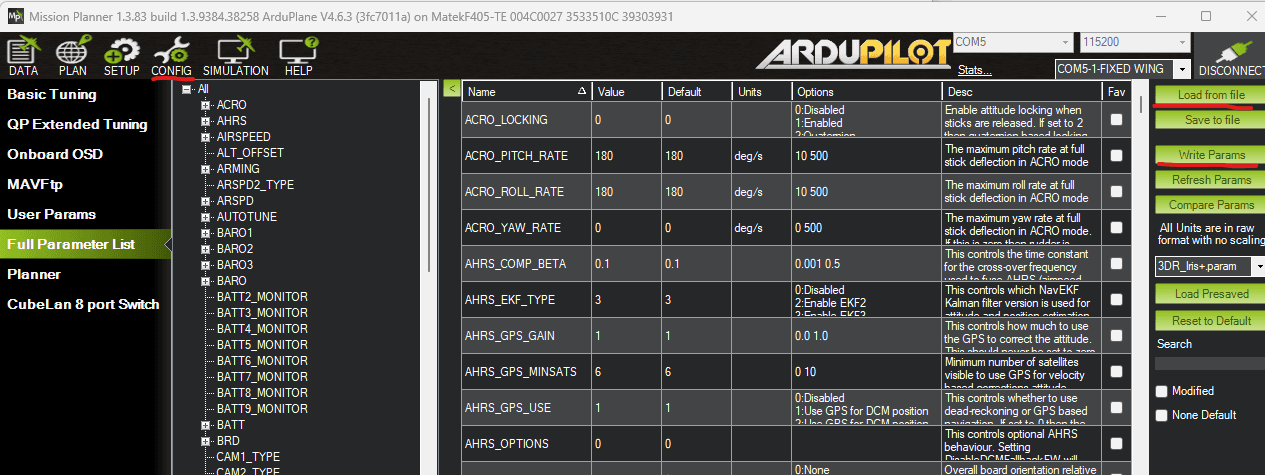
Step 4: TEST WITHOUT PROPS: Verify if the motor directions are correct and that they spin correctly.
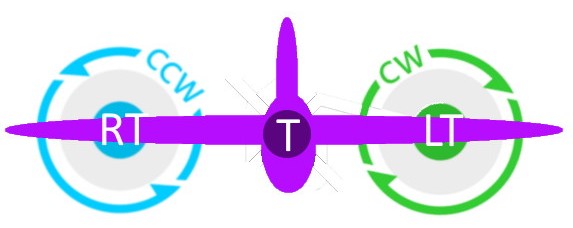
Step 5: Test the aileron directions and verify that the artificial horizon is working correctly.
For more information about ArduPilot tailsitter configuration, see the official documentation: ArduPilot Tailsitter Guide